🤖 Clawbot: Educational Guide
Understanding the Technology & Realistic Business Opportunities
⚠️ Important Disclaimer - Please Read
- Income claims like "$3,700 in 3 days" are NOT typical results and should not be expected
- These claims are often marketing hype used to sell courses or services
- Clawbot is a technical tool that requires learning and effort to use effectively
- Monetization requires real business skills (sales, marketing, client management)
- This guide is for educational purposes to help you understand the technology
- Past performance does not guarantee future results
📋 Table of Contents
What is Clawbot?
Clawbot (also known as ClawdBot or OpenClaw) is an open-source, self-hosted AI assistant that runs on your own infrastructure rather than in the cloud. Unlike ChatGPT or other cloud-based AI services, Clawbot gives you complete control over your data and AI interactions.
🔐 Privacy-First
Your data stays on your own servers. No third-party companies collect or mine your conversations.
⚡ Active Automation
Unlike passive chatbots, Clawbot can execute commands, control applications, and perform tasks autonomously.
🌐 Multi-Platform
Connect via WhatsApp, Telegram, Discord, Slack, Signal, iMessage, and 15+ other platforms.
🛠️ Extensible
565+ community-developed skills and custom integrations available through the ClawdHub marketplace.
💰 Free & Open-Source
100% free under MIT License. You only pay for AI API usage (or use free local models).
🧠 Model-Agnostic
Use Claude, GPT-4, or free local models via Ollama. Switch providers anytime.
What Clawbot Can Actually Do
- Execute shell commands and scripts on your system
- Read, write, and organize files automatically
- Control web browsers and automate web tasks
- Monitor system resources and send alerts
- Integrate with 50+ services and APIs
- Schedule tasks and send proactive notifications
- Manage emails, calendars, and reminders
- Control smart home devices (Home Assistant integration)
- Perform data analysis and generate reports
- Assist with DevOps tasks and deployments
How Clawbot Works
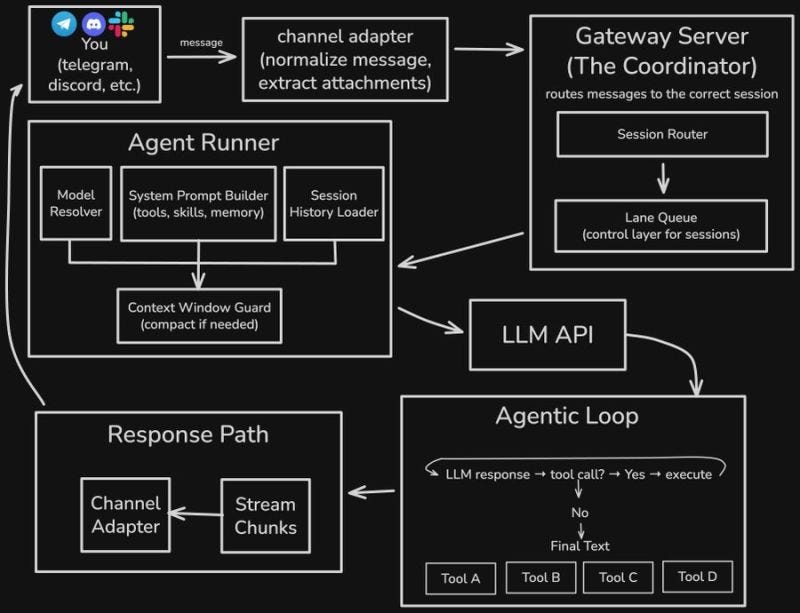
Core Components
System Architecture
- Gateway Server: The central coordinator that routes messages between messaging platforms and AI models
- Agent Runner: Processes requests, manages tools/skills, and maintains conversation history
- Channel Adapters: Connect to WhatsApp, Telegram, Discord, etc.
- LLM Integration: Connects to Claude, GPT-4, or local Ollama models
- Tools & Skills: Executable functions that perform real tasks on your system
- Memory System: Stores conversation history and context using markdown files
Technical Setup Requirements
⚠️ Technical Skills Required
Despite claims of "no coding" and "no tech skills," setting up Clawbot effectively requires:
- Basic command-line/terminal familiarity
- Understanding of Node.js and npm
- Server management (if self-hosting)
- API key configuration
- Problem-solving and debugging skills
Minimum Requirements
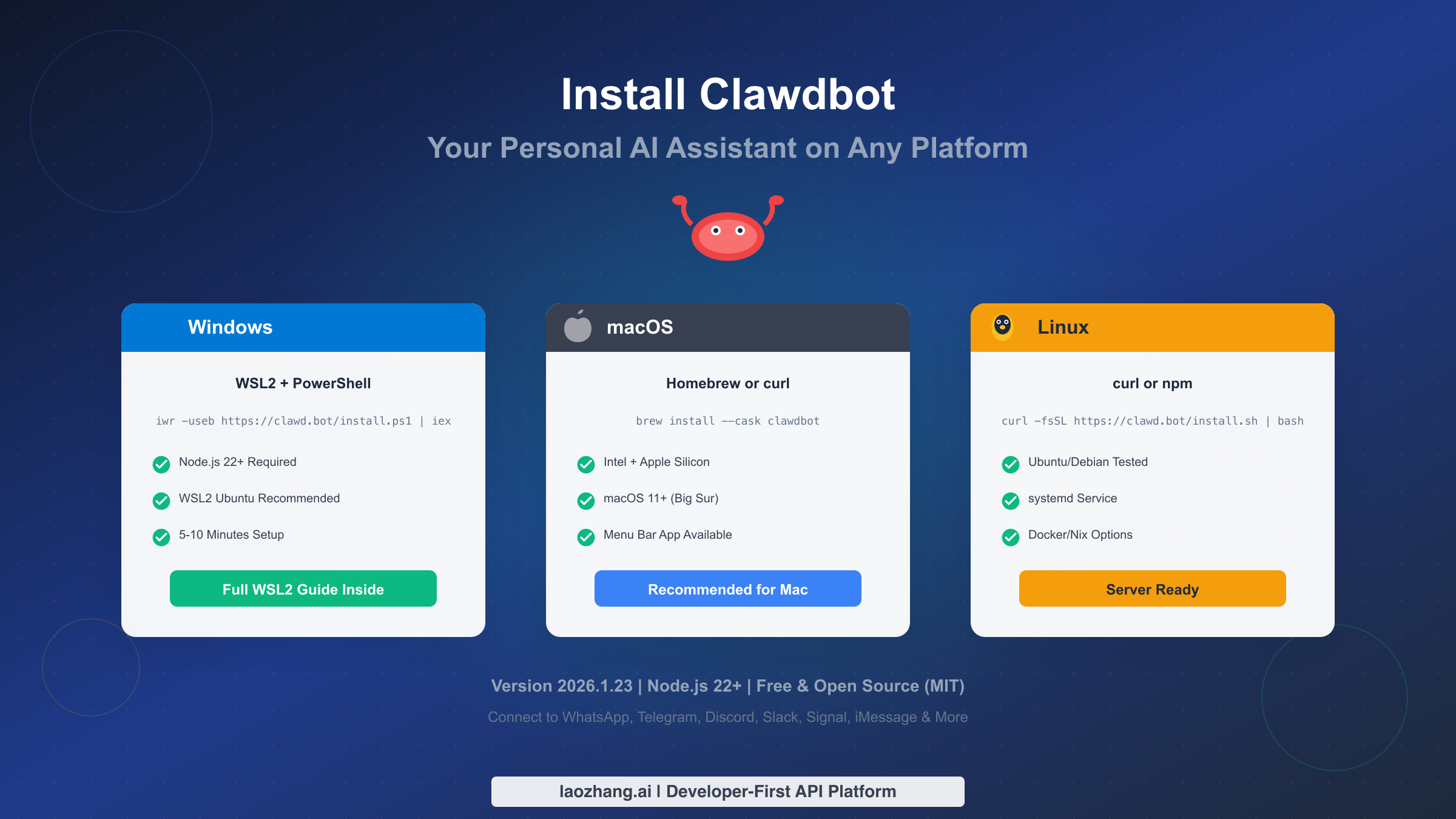
- Operating System: macOS, Linux, or Windows (via WSL2/Docker)
- RAM: 4GB minimum (8GB+ recommended)
- Storage: 2GB free space
- Internet: Stable connection for cloud AI models
- Node.js: Version 22 or higher
Installation Steps Overview
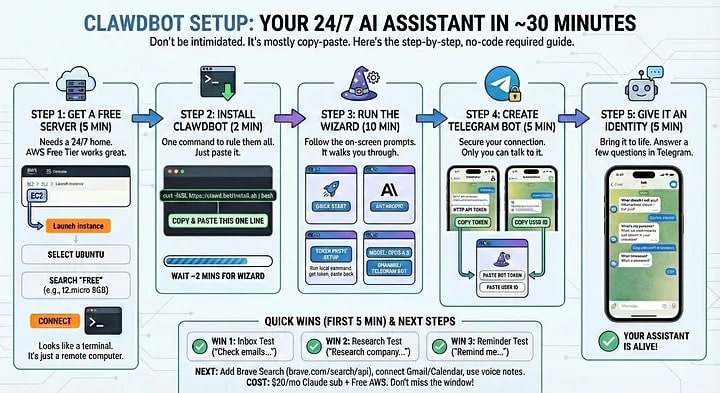
Prepare Your Environment
Install Node.js 22+, set up a code editor (VS Code recommended), and create a GitHub account for version control.
Install Clawbot
macOS: brew install --cask clawbot
Linux: curl -fsSL https://clawd.bot/install.sh | bash
Windows: Use WSL2 or Docker
Choose Your AI Model
Cloud Options: Get API keys from Anthropic (Claude) or OpenAI (GPT-4)
Free Option: Install Ollama for local models (requires more RAM/GPU)
Connect Messaging Platforms
Configure WhatsApp, Telegram, Discord, or other channels through the Gateway dashboard. Each platform has specific setup requirements.
Install Skills & Configure Tools
Browse the ClawdHub marketplace for pre-built skills. Configure permissions and security settings for system access.
Realistic Monetization Methods
While viral posts claim thousands in days, here are legitimate business models people actually use with Clawbot:
1️⃣ AI Assistant Setup Service
What you do: Help busy professionals and executives set up personalized Clawbot assistants configured to their workflows.
Services include:
- Initial installation and configuration
- Integration with their tools (email, calendar, CRM)
- Custom skill development for their needs
- Training and documentation
- Ongoing support and maintenance
Who pays: Founders, CEOs, consultants, executives who value privacy and efficiency
Skills needed: Technical setup, client communication, project management
2️⃣ Chat-Based Automation Agency
What you do: Build custom automation workflows for businesses that can be controlled via chat commands.
Example automations:
- E-commerce: "Generate weekly sales report" → Auto-creates and emails PDF
- Marketing: "Schedule social media posts" → Queues content across platforms
- Operations:


Comments